What is Website Development? Complete Beginner’s Guide
Introduction
Think about the last time you wanted to buy a product or hire a service. There’s a good chance you searched online before making any decision.
That’s exactly how most customers behave today. If a business doesn’t have a website, many people simply move to a competitor who does.
A website is more than a few pages on the internet. It helps people learn about your business, contact you, check your services, and even place orders without visiting your office.
Whether you run a small local shop or a growing company, a website has become one of the most important business assets.
In this guide, you’ll understand what website development really means, how it is different from website design, and why it plays such an important role in building a successful online business.
What is Website Development
Website development is the process of building a website so it works properly on the internet. It includes writing code, creating features, connecting databases, improving speed, and making sure everything functions smoothly across different devices and browsers.
Many beginners think website design and website development are the same thing, but they are different. Website design focuses on how a website looks, while website development turns that design into a working website that visitors can actually use.
A simple way to understand this is by comparing it to building a house. The architect creates the blueprint and appearance, while the engineers and workers build the structure. The same happens with websites.
Website development is mainly divided into two parts:
- Frontend Development is everything visitors can see and interact with, such as buttons, images, menus, forms, and layouts.
- Backend Development works behind the scenes. It stores data, processes requests, manages user accounts, and keeps the website running.
Why Website Development Matters
A professionally developed website does much more than create an online presence. It helps build trust because customers expect legitimate businesses to have a reliable website. It strengthens your brand by presenting consistent information and a professional image.
A website also generates leads through contact forms, bookings, and inquiries, while helping you sell products or services online. Many business tasks, such as appointment scheduling, order management, and customer support, can be automated, saving both time and effort.
As your business grows, a well-developed website becomes a foundation that supports marketing, customer engagement, and long-term business growth.
Types of Websites
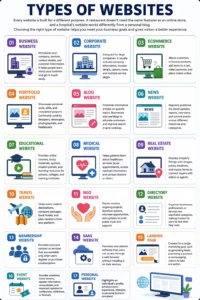
Every website is built for a different purpose. A restaurant doesn’t need the same features as an online store, and a hospital’s website works differently from a personal blog. Choosing the right type of website helps you meet your business goals and gives visitors a better experience.
Business Website
A business website introduces your company, services, contact details, and customer information. It helps people learn about your business and get in touch easily.
Corporate Website
Corporate websites are designed for large companies. They usually include company information, investor details, careers, news, and multiple service pages.
Ecommerce Website
An ecommerce website allows customers to browse products, add items to a cart, make payments, and place orders online.
Portfolio Website
Portfolio websites showcase personal work, skills, and completed projects. They are commonly used by designers, developers, photographers, and freelancers.
Blog Website
A blog website publishes informative articles on specific topics. Businesses also use blogs to educate customers and improve search engine rankings.
News Website
News websites regularly publish the latest updates, reports, interviews, and current events across different industries and categories.
Educational Website
Educational websites provide online courses, study materials, quizzes, student portals, and learning resources for schools, colleges, and training institutes.
Medical Website
Medical websites help patients learn about healthcare services, book appointments, access medical information, and contact doctors or clinics.
Real Estate Website
Real estate websites display property listings with images, prices, locations, and inquiry forms to connect buyers with sellers or agents.
Travel Website
Travel websites help users explore destinations, compare packages, book hotels, and plan vacations from one platform.
NGO Website
NGO websites share their mission, ongoing projects, donation options, volunteer opportunities, and updates to build public trust and support.
Directory Website
Directory websites organize businesses, professionals, or services into searchable categories, making it easier for users to find what they need.
Membership Website
Membership websites provide exclusive content or services that are available only after users register or purchase a subscription.
SaaS Website
SaaS websites promote and deliver software that users can access through a web browser without installing it on their devices.
Landing Page
A landing page is created for a single marketing goal, such as generating leads, promoting a product, or encouraging visitors to take one action.
Event Website
Event websites provide schedules, ticket booking, speaker information, venue details, and important updates for conferences, exhibitions, or festivals.
Personal Website
A personal website highlights an individual’s profile, achievements, experience, interests, or personal brand in one place.
Types of Website Development
The development process depends on what a website needs to achieve. Some websites only display information, while others manage users, payments, or large amounts of data. That’s why different development approaches are used for different projects.
Static Website Development
Static websites display fixed content that remains the same until someone manually updates the website.
Dynamic Website Development
Dynamic websites generate content automatically based on user actions, databases, or real-time information.
CMS Development
CMS development uses a Content Management System that allows website owners to update pages without writing code.
WordPress Development
WordPress development builds websites using the WordPress platform, making content management simple for businesses and beginners.
Ecommerce Development
Ecommerce development focuses on creating online stores with product management, shopping carts, payment gateways, and order tracking.
Custom Website Development
Custom website development creates unique websites built specifically around a business’s goals, features, and workflows.
Full Stack Development
Full stack development covers both frontend and backend development, allowing developers to build complete web applications.
Progressive Web Apps (PWA)
Progressive Web Apps combine the experience of a website and a mobile app, offering faster loading and offline functionality.
Headless CMS
A headless CMS separates content management from website presentation, making it easier to publish content across multiple platforms.
Enterprise Website Development
Enterprise website development is designed for large organizations that require advanced security, integrations, scalability, and complex business processes.
Website Development Process
Building a website isn’t just about writing code. A successful website follows a step-by-step process where every stage prepares the foundation for the next one.
Skipping any step often leads to delays, higher costs, or a website that doesn’t perform well.
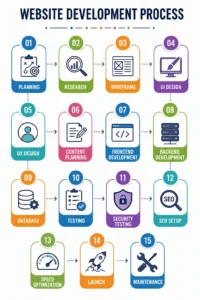
Planning
The project begins by defining the website’s goals, target audience, required features, budget, and timeline before any design or development starts.
Research
Research helps understand competitors, customer expectations, industry trends, and the best structure for achieving business objectives.
Wireframe
A wireframe is a simple blueprint that shows the placement of menus, images, buttons, and content before visual design begins.
UI Design
UI (User Interface) design focuses on colors, typography, layouts, icons, and visual elements that create an attractive website.
UX Design
UX (User Experience) design ensures visitors can navigate the website easily and complete tasks without confusion or frustration.
Content Planning
Content planning organizes pages, headings, images, and calls to action so users and search engines understand the website clearly.
Frontend Development
Frontend development converts the design into an interactive website using technologies that visitors can see and use.
Backend Development
Backend development creates the server-side functionality that manages users, forms, databases, payments, and other business logic.
Database
The database stores important information such as customer details, products, orders, blog posts, and website settings securely.
Testing
Testing checks whether every page, feature, and form works correctly across different devices and web browsers.
Security Testing
Security testing identifies vulnerabilities and protects the website against hacking, malware, spam, and unauthorized access.
SEO Setup
SEO setup includes creating clean URLs, meta tags, schema, XML sitemaps, and other technical elements that improve search visibility.
Speed Optimization
Speed optimization reduces loading time through image compression, caching, code optimization, and performance improvements.
Launch
After final approval and testing, the website is published online so visitors can access it through its domain.
Maintenance
Regular maintenance keeps the website updated, secure, bug-free, and compatible with changing technologies and customer needs.
learn more about the steps of the website development process in detail.
Essential Components of a Website
Every website depends on several core components working together. Without these essentials, a website cannot be accessed, managed, or protected properly.
Domain
A domain is your website’s address that people type into their browser to visit your website.
Hosting
Hosting stores all website files on a server, making them available to visitors around the clock.
SSL
An SSL certificate encrypts data between the website and users while displaying the secure HTTPS connection.
Database
The database stores dynamic website content such as users, products, blog posts, and customer information.
CMS
A Content Management System (CMS) allows website owners to update pages and publish content without coding.
CDN
A Content Delivery Network (CDN) delivers website files from servers located closer to visitors, improving loading speed.
Professional business email addresses create trust and improve communication with customers and clients.
DNS
DNS connects your domain name with the hosting server, allowing browsers to locate and display your website.
Best Programming Languages for Website Development
Different programming languages solve different problems. Some build website layouts, while others manage servers, databases, or complex business applications.
Choosing the right language depends on the type of website you want to develop.
| Language | Best For | Common Use Case |
|---|---|---|
| HTML | Website structure | Creating page layouts and content structure |
| CSS | Website styling | Designing layouts, colors, fonts, and responsive pages |
| JavaScript | Interactive websites | Sliders, animations, forms, and dynamic user interfaces |
| PHP | Dynamic websites | WordPress websites, business websites, and web applications |
| Python | Scalable web applications | AI projects, automation, data-driven websites, and web apps |
| Java | Enterprise applications | Banking systems, large business platforms, and secure applications |
| C# | Microsoft-based development | Enterprise portals and ASP.NET web applications |
| TypeScript | Large JavaScript projects | Complex frontend applications with better code reliability |
| Node.js | Backend development | APIs, real-time applications, and fast server-side development |
| Go | High-performance applications | Cloud platforms, APIs, and scalable backend systems |
| Ruby | Rapid web development | Startup products and applications built with Ruby on Rails |
Best Frameworks for Website Development
Frameworks help developers build websites and web applications faster by providing ready-made tools, reusable code, and organized project structures. The right framework depends on the project’s size, features, and technology stack.
| Framework | Best For | Common Use Case |
|---|---|---|
| React | Interactive user interfaces | Dashboards, SaaS products, and single-page applications |
| Angular | Enterprise applications | Large business platforms with complex functionality |
| Vue.js | Lightweight web applications | Small to medium business websites and web apps |
| Next.js | SEO-friendly React websites | Business websites, blogs, and ecommerce platforms |
| Nuxt.js | SEO-friendly Vue applications | Fast websites built with Vue.js |
| Laravel | PHP web development | Custom websites, CRMs, and business portals |
| Django | Python web applications | Secure, scalable websites and data-driven platforms |
| Express.js | Node.js backend | APIs, web applications, and real-time services |
| ASP.NET | Microsoft ecosystem | Enterprise portals and business applications |
| Spring Boot | Java enterprise development | Banking systems, enterprise software, and large-scale platforms |
Best CMS Platforms
A Content Management System (CMS) allows you to create, manage, and update website content without building everything from scratch. Each platform has its own strengths, so choosing the right one depends on your website’s goals and future growth.
| CMS Platform | Easy to Use | SEO | Cost | Ecommerce | Scalability |
|---|---|---|---|---|---|
| WordPress | Excellent | Excellent | Low | Good | Excellent |
| Shopify | Excellent | Good | Medium | Excellent | Good |
| Drupal | Moderate | Excellent | Medium | Good | Excellent |
| Joomla | Moderate | Good | Low | Good | Good |
| Wix | Excellent | Good | Medium | Basic | Limited |
| Squarespace | Excellent | Good | Medium | Good | Moderate |
| Webflow | Good | Excellent | Medium | Good | Good |
| Magento | Difficult | Excellent | High | Excellent | Excellent |
WordPress
The world’s most popular CMS, suitable for blogs, business websites, ecommerce stores, and custom websites with thousands of available plugins.
Shopify
Designed specifically for ecommerce businesses that need an easy way to manage products, payments, and online orders.
Drupal
A powerful CMS used by large organizations that require advanced security, flexibility, and custom content management.
Joomla
A flexible platform that offers more built-in features than many beginner-focused CMS solutions while remaining customizable.
Wix
A drag-and-drop website builder ideal for small businesses, portfolios, and users with little technical knowledge.
Squarespace
Known for professionally designed templates, making it a popular choice for creatives and small businesses.
Webflow
Combines visual website design with clean code generation, making it popular among designers and agencies.
Magento
An enterprise-level ecommerce platform built for large online stores with complex product catalogs and advanced selling features.
Website Development Cost
Website development costs vary from one project to another because every business has different goals. A simple company website costs much less than an ecommerce platform or a custom business application.
Understanding the factors that affect pricing helps you plan your budget more accurately.
Factors That Affect Website Development Cost
Number of Pages: A website with more pages requires additional design, development, testing, and content work, increasing the overall cost.
Features: Custom features like user accounts, booking systems, payment gateways, chat support, or dashboards require extra development time.
CMS Selection: Using platforms like WordPress usually costs less than building a fully custom website from scratch.
Custom Design: Unique UI and UX designs require more planning and design work compared to ready-made templates.
Developer Experience: Experienced developers generally charge higher rates because they deliver better quality, performance, and long-term reliability.
Development Agency: Agencies often cost more than freelancers because they provide designers, developers, testers, project managers, and ongoing support.
Maintenance After launch, websites need updates, backups, security monitoring, bug fixes, and performance improvements to stay reliable.
Estimated Website Development Cost by Project Type
| Website Type | Estimated Cost (USD) |
|---|---|
| Small Business Website | $500 – $3,000 |
| Corporate Website | $3,000 – $15,000 |
| Ecommerce Website | $2,000 – $30,000+ |
| Custom Web Application | $5,000 – $50,000+ |
| Enterprise Website | $25,000 – $250,000+ |
Average Website Development Cost by Country
| Country | Typical Development Cost |
|---|---|
| India | Lower cost with a wide range of skilled developers and agencies |
| United States | High development rates with premium agency pricing |
| United Kingdom | Higher pricing for business and enterprise projects |
| Canada | Similar to the US with strong agency-based development |
| Australia | Premium pricing, especially for custom business websites |
The final cost always depends on the project’s complexity, technology stack, timeline, integrations, and long-term maintenance requirements.
Getting a detailed project scope before requesting quotations makes it much easier to compare proposals from different developers or agencies.
Website Development Timeline
How long does it takes to build a website depends on its size, features, content, and approval process. A simple landing page can be completed within days, while custom business platforms may take several months because they involve planning, development, testing, and multiple revisions.
| Website Type | Estimated Timeline |
|---|---|
| Landing Page | 3–7 Days |
| Business Website | 2–4 Weeks |
| Corporate Website | 4–8 Weeks |
| Ecommerce Website | 6–12 Weeks |
| Custom SaaS Application | 3–12 Months |
Keep in mind that delays in content, design approvals, or feature changes can extend the overall project timeline.
Website Security
A website is connected to the internet 24/7, which means it is constantly exposed to security threats. Strong security protects customer data, prevents downtime, and helps maintain trust with both users and search engines.
SSL Certificate
An SSL certificate encrypts data exchanged between visitors and the website, creating a secure HTTPS connection.
Firewall
A web application firewall filters suspicious traffic and blocks many common attacks before they reach the website.
Regular Backups
Automatic backups allow you to restore your website quickly if files are lost, damaged, or hacked.
Malware Protection
Security tools scan the website for malicious files and remove threats before they affect visitors.
Security Headers
Security headers instruct browsers to handle website resources safely and reduce common web vulnerabilities.
HTTPS
HTTPS ensures all communication between the browser and the server remains encrypted and secure.
Strong Passwords
Using unique, complex passwords makes unauthorized access much more difficult for attackers.
Two-Factor Authentication
Two-factor authentication adds an extra verification step beyond a password, improving account security.
CAPTCHA
CAPTCHA helps prevent spam submissions, fake registrations, and automated bot attacks on forms.
Regular Updates
Updating the CMS, plugins, themes, and server software closes known security vulnerabilities and improves overall stability.
Website Speed Optimization
Website speed affects user experience, search rankings, and conversion rates. Even a well-designed website can lose visitors if pages take too long to load. Speed optimization focuses on reducing loading time while maintaining functionality and visual quality.
Core Web Vitals
Core Web Vitals are Google’s performance metrics that measure loading speed, responsiveness, and visual stability.
Largest Contentful Paint (LCP)
LCP measures how quickly the main content of a page becomes visible to users.
Cumulative Layout Shift (CLS)
CLS measures unexpected layout movements while a page is loading, helping improve visual stability.
Interaction to Next Paint (INP)
INP evaluates how quickly a website responds when users click, tap, or interact with page elements.
Image Compression
Optimized images reduce file sizes without significantly affecting visual quality, improving page loading speed.
Content Delivery Network (CDN)
A CDN serves website files from servers closer to visitors, reducing loading times worldwide.
Caching
Caching stores frequently used website resources so returning visitors can load pages much faster.
Lazy Loading
Lazy loading delays images and videos until they are needed, reducing the initial page load.
Minification
Minification removes unnecessary characters from HTML, CSS, and JavaScript files to reduce their size.
Quality Hosting
Fast and reliable hosting provides better server performance and improves overall website responsiveness.
Font Optimization
Loading fewer font files and using modern formats helps reduce unnecessary requests and improves rendering speed.
Database Optimization
Cleaning unused data and optimizing database queries improves the performance of dynamic websites.
SEO & Website Development
A website should be built for both users and search engines. SEO is not something that should be added after development is complete. Many technical SEO elements are easier, faster, and more effective when they are planned during the website development process.
A well-developed website provides the foundation for better rankings, improved user experience, and long-term organic growth.
Technical SEO
Technical SEO ensures search engines can crawl, understand, and index website pages without unnecessary obstacles.
URL Structure
Simple, descriptive URLs help users understand page topics and make websites easier for search engines to crawl.
Internal Linking
Internal links connect related pages, improve navigation, distribute authority, and help search engines discover important content.
Mobile-Friendly Design
Responsive websites provide a consistent experience across desktops, tablets, and smartphones, which is essential for modern SEO.
Schema Markup
Schema helps search engines understand website content and increases the chances of earning rich search results.
Breadcrumb Navigation
Breadcrumbs improve navigation, help users understand page hierarchy, and provide additional context to search engines.
XML Sitemap
An XML sitemap lists important website pages, making it easier for search engines to discover and index new content.
Robots.txt
The robots.txt file guides search engine crawlers by indicating which sections of a website should or should not be accessed.
Canonical Tags
Canonical tags prevent duplicate content issues by identifying the preferred version of similar pages.
Redirects
Proper redirects preserve SEO value when pages are moved, renamed, or deleted while preventing broken links.
Meta Tags
Well-written title tags and meta descriptions improve search visibility and encourage more users to click on search results.
Heading Structure
A logical heading hierarchy improves readability for visitors while helping search engines understand page content.
Page Speed
Fast-loading websites improve user experience, reduce bounce rates, and support stronger search engine rankings over time.
Website Accessibility
A good website should be easy for everyone to use, including people with visual, hearing, or physical disabilities. Website accessibility improves the user experience, helps businesses reach a wider audience, and supports better compliance with modern web standards. Search engines also benefit from accessible websites because many accessibility practices improve content structure and usability.
Alt Text
Alt text describes images for screen readers and also helps search engines understand visual content when images cannot be displayed.
Keyboard Navigation
Users should be able to access menus, forms, buttons, and links using only a keyboard without relying on a mouse.
Color Contrast
Good color contrast makes text easier to read, especially for users with low vision or color blindness.
ARIA Labels
ARIA labels provide additional information to assistive technologies, making complex website elements easier to understand and use.
Website Maintenance
Launching a website is only the beginning. Regular maintenance keeps the website secure, fast, and compatible with changing technologies. Without ongoing maintenance, even a well-built website can develop security issues, broken features, and outdated content over time.
Daily Maintenance
Daily tasks include checking website availability, monitoring security alerts, reviewing contact form submissions, and ensuring backups are running successfully.
Weekly Maintenance
Weekly maintenance involves updating content, testing important website functions, checking for broken links, and reviewing website performance.
Monthly Maintenance
Monthly maintenance focuses on software updates, security reviews, SEO improvements, database optimization, and detailed performance analysis.
Updates
Regularly updating the CMS, plugins, themes, and server software helps improve stability and fixes known vulnerabilities.
Backup
Scheduled backups ensure the website can be restored quickly if data is lost or unexpected problems occur.
Performance Monitoring
Performance monitoring identifies slow pages, server issues, and optimization opportunities before they affect visitors.
Security Monitoring
Regular security checks help detect malware, suspicious activity, and vulnerabilities that could compromise the website.
Content Updates
Keeping content accurate and up to date improves user experience while maintaining search engine relevance.
Broken Link Checks
Finding and fixing broken links improves navigation and prevents users from reaching missing pages.
SEO Audit
Regular SEO audits identify technical issues, indexing problems, and optimization opportunities that support long-term organic growth.
Common Website Development Mistakes
Many websites fail to deliver results because important development practices are overlooked. Avoiding these common mistakes can improve performance, user experience, and long-term business growth.
Poor Navigation
Confusing menus and unclear page structures make it difficult for visitors to find the information they need.
No Mobile Optimization
A website that doesn’t work properly on smartphones creates a poor user experience and can reduce search visibility.
Slow Website
Large images, unoptimized code, and poor server performance often lead to slow loading pages and higher bounce rates.
Bad Hosting
Low-quality hosting can cause frequent downtime, slower performance, and security problems.
Ignoring SEO
Building a website without considering technical SEO makes it harder for search engines to crawl and rank pages.
Weak Security
Missing security measures increase the risk of hacking, malware infections, and customer data breaches.
Too Many Plugins
Installing unnecessary plugins can slow down the website, create compatibility issues, and introduce security risks.
No Backup Strategy
Without regular backups, recovering from accidental data loss or security incidents becomes much more difficult.
No Clear Call-to-Action (CTA)
Visitors should always know the next step, whether it’s contacting your business, requesting a quote, or making a purchase.
No Analytics
Without analytics tools, it becomes difficult to understand visitor behavior, measure performance, or make informed business decisions.
Latest Website Development Trends
Website development continues to evolve as new technologies improve performance, security, and user experience. While not every trend is suitable for every project, understanding these technologies helps businesses make better decisions for future website upgrades.
AI Website Development
AI tools assist with layouts, content suggestions, design ideas, and basic website creation, reducing development time for simple projects.
AI Coding
Developers use AI coding assistants to write code faster, identify errors, and improve productivity during development.
Headless CMS
A headless CMS separates content management from the frontend, making it easier to publish content across websites, mobile apps, and other digital platforms.
Progressive Web Apps (PWAs)
PWAs combine the experience of a website and a mobile app by offering faster performance, offline access, and app-like functionality.
Serverless Architecture
Serverless development allows developers to build applications without managing physical servers, improving scalability and reducing infrastructure management.
Jamstack
Jamstack generates fast, secure websites by combining static pages with APIs and modern development workflows.
Motion UI
Motion UI uses subtle animations and transitions to improve navigation, user engagement, and the overall browsing experience.
Dark Mode
Dark mode provides an alternative color theme that many users prefer, especially in low-light environments.
Voice Search Optimization
Modern websites increasingly consider voice search by using natural language content and structured data.
AI Chatbots
AI-powered chatbots provide instant customer support, answer common questions, and help generate leads around the clock.
WebAssembly
WebAssembly enables high-performance applications to run directly in web browsers, making complex web applications faster and more efficient.
How to Choose a Website Development Company
Choosing the right website development company is one of the most important business decisions you’ll make. A professional team doesn’t just build a website—they create a platform that supports your marketing, customer experience, and future business growth.
Before making a decision, evaluate each company using the following checklist.
Experience
Look for a company that has successfully completed projects similar to your business requirements.
Portfolio
Review previous websites to evaluate design quality, functionality, performance, and industry experience.
Client Reviews
Read verified reviews and testimonials to understand customer satisfaction and long-term reliability.
Technology Stack
Ensure the company works with modern technologies that match your project’s current and future needs.
Support
Ask whether post-launch support is included for bug fixes, updates, and technical assistance.
Pricing
Choose transparent pricing with a clear project scope instead of selecting the lowest quotation alone.
Communication
Regular updates, clear timelines, and responsive communication help projects stay on schedule.
SEO Knowledge
A development company should understand technical SEO so your website is built with search engine visibility in mind from the beginning.
Security
Confirm that security best practices such as SSL, backups, secure coding, and vulnerability protection are part of the development process.
Maintenance
Check whether ongoing maintenance services are available to keep the website secure, updated, and performing well after launch.
Why Choose Web Development Company Ahmedabad
Building a successful website requires more than attractive design. It takes careful planning, modern development practices, technical SEO, and long-term support.
At Web Development Company Ahmedabad, we focus on creating websites that not only look professional but also help businesses generate leads, improve online visibility, and support long-term growth.
Experienced Team
Our team has experience developing business websites, ecommerce platforms, corporate websites, and custom web applications for businesses across different industries.
Structured Development Process
Every project follows a proven process that includes planning, UI/UX design, development, testing, SEO setup, performance optimization, and post-launch support.
Modern Technologies
We work with leading technologies including WordPress, Laravel, React, Next.js, PHP, JavaScript, and custom development solutions based on your business requirements.
SEO-Friendly Development
Every website is built with clean code, responsive design, optimized URLs, fast loading speeds, schema markup, and technical SEO best practices to support better search engine performance.
Ongoing Support
Our relationship doesn’t end after launch. We provide maintenance, updates, security monitoring, backups, and technical support to keep your website running smoothly.
Transparent Pricing
We offer clear project estimates with no hidden charges, helping businesses choose solutions that match their goals and budget.
Industries We Serve
We have experience building websites for startups, manufacturers, healthcare providers, educational institutions, real estate companies, travel businesses, professional service firms, and many other industries.
Whether you need a simple business website or a fully custom web application, our goal is to deliver a website that is fast, secure, scalable, and designed to support your business as it grows.
Final Conclusion
Website development is much more than creating a website that looks good. It involves planning, design, coding, security, speed optimization, SEO, maintenance, and continuous improvements to ensure the website supports your business goals.
When all these elements work together, your website becomes a valuable asset that builds trust, attracts customers, and helps your business grow online.
Whether you’re planning your first website, redesigning an existing one, or building a custom web application, understanding the development process makes it easier to choose the right technology, set a realistic budget, and work with the right development team.
If you’re ready to build a fast, secure, and SEO-friendly website, Web Development Company Ahmedabad can help. Our team develops custom websites designed for performance, user experience, and long-term business growth. Contact us today to discuss your project and receive a free consultation on the best solution for your business.